Placing an order
Market and limit orders, leverage, fees, take-profit and stop-loss, and the risk caps enforced when you trade.
You place orders from the order panel on the right of the terminal. Every order is simulated against the live market price, with simulated fees and the same risk caps a funded account uses. This page is the quick how-to; the Terminal page is the full panel reference, and the Trading rules are the authoritative source for the limits.
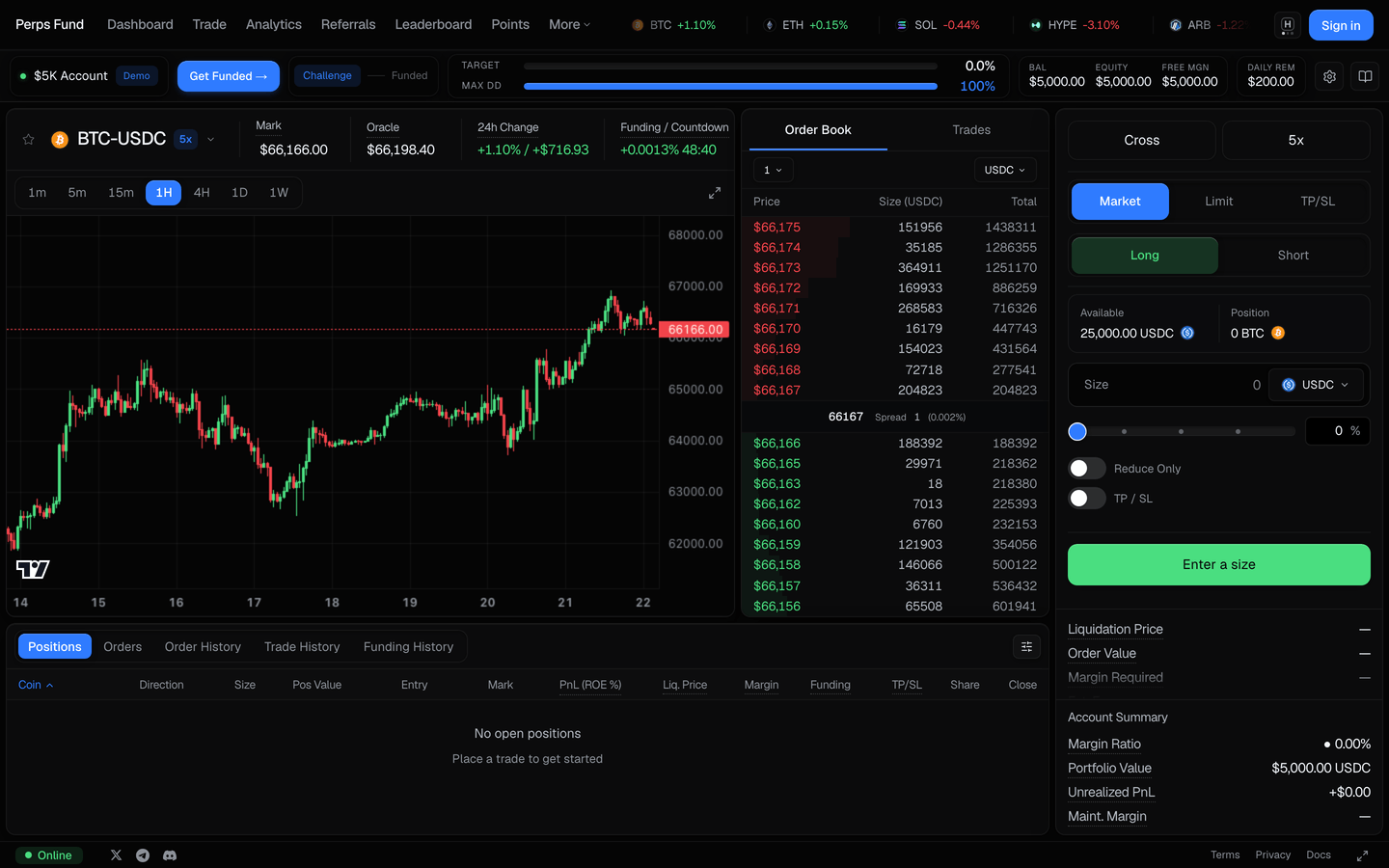
Market vs limit orders
- Market orders fill immediately at the freshest available price. The fill is rejected if the reference price is older than 2 seconds or has moved more than 0.5% from the price you saw, so you are never filled on a stale quote. Market fills pay the taker fee.
- Limit orders rest until the market reaches your price, then fill at the better of your limit and the market price (you never pay worse than your limit). Resting limit fills pay the maker fee.
For either type you choose a side (long or short), a size (in USDC or the asset), and your leverage, and you can attach an optional take-profit and stop-loss (below).
Leverage caps
Leverage is capped per market by firm policy, and the cap is re-applied on the server, so it cannot be exceeded by editing a request:
| Asset tier | Max leverage |
|---|---|
| Majors - BTC, ETH | 5x |
| Stocks, indices, commodities, FX | 4x |
| Other crypto | 2x |
The leverage control in the terminal shows the firm maximum for the selected market. See the Trading rules for how the caps are enforced.
Position sizing
Position size scales with your leverage, checked at order time (and re-checked when a limit order fills), all measured against your equity:
| Limit | Value |
|---|---|
| Max position | up to equity × leverage |
| Total margin used | ≤ your equity |
| Minimum order | $10 notional |
An order that would breach a cap is rejected before it fills. A resting limit order that would breach a cap at fill time is kept resting rather than filled.
Fees
| Fee | Rate |
|---|---|
| Taker (market orders, marketable fills, closes) | 0.045% of notional |
| Maker (resting limit fills) | 0.015% of notional |
Funding is charged or paid on open positions over time; you can see it in the Funding history tab.
Take-profit and stop-loss
You can attach an optional take-profit and stop-loss to an order, or add and edit them on an open position later from the position's Adjust control.
- A take-profit closes the position when the market moves in your favor to your target, locking in the gain.
- A stop-loss closes it when the market moves against you to your limit, capping the loss.
The side is enforced so a level can only sit where it makes sense: for a long, the take-profit is above your entry and the stop-loss below it; for a short, it is the other way around. A wrong-side level, or a stop-loss that would sit past your take-profit, is rejected when you set it. Once set, the levels are watched continuously against the mark price, and a triggered level closes the position at market (paying the taker fee), on a funded account and in the demo alike.
What happens on submit
- Your leverage is clamped to the firm cap and the freshest price is fetched.
- The order is checked against your equity (drawdown) and the position caps above.
- If it passes, the position opens (or averages into an existing same-side position); the open fee is deducted.
- Opening on the opposite side of an existing position closes that position first and realizes its P&L.
You are always filled on a fresh price
A fill uses a price no older than 2 seconds and within 0.5% of what you saw, so a stale or gapped quote is rejected rather than filled at a bad price. Leverage multiplies both your gains and your losses against the risk limits, so size it deliberately.
Related
- The terminal - the full order panel, chart, positions, and history reference.
- Trading rules - the authoritative limits: drawdown, breach, leverage, and caps.
- How it works - the evaluation model, from buying to getting paid.