Payouts
How funded traders withdraw their profit share: request, review, and get paid in USDC to a whitelisted wallet.
The Payouts page is where a funded trader withdraws their share of profit. You request a withdrawal, it goes through a review, and once approved it is paid in USDC to a wallet you have whitelisted. Payouts are on request, not on a schedule, and the amount is reserved when you request it and refunded in full if the request is rejected.
A payout is per account. If you hold more than one funded account, each one earns and holds its own share of profit, you pick which account a withdrawal draws from, and the request takes that account's full available share. Balances are never combined into a single withdrawal.
Only realized profit above that account's previous high-water mark is payable, so the same profit is never paid twice. The exact enforced numbers live in Payouts and withdrawals in the Rules; this page explains the page and the flow.
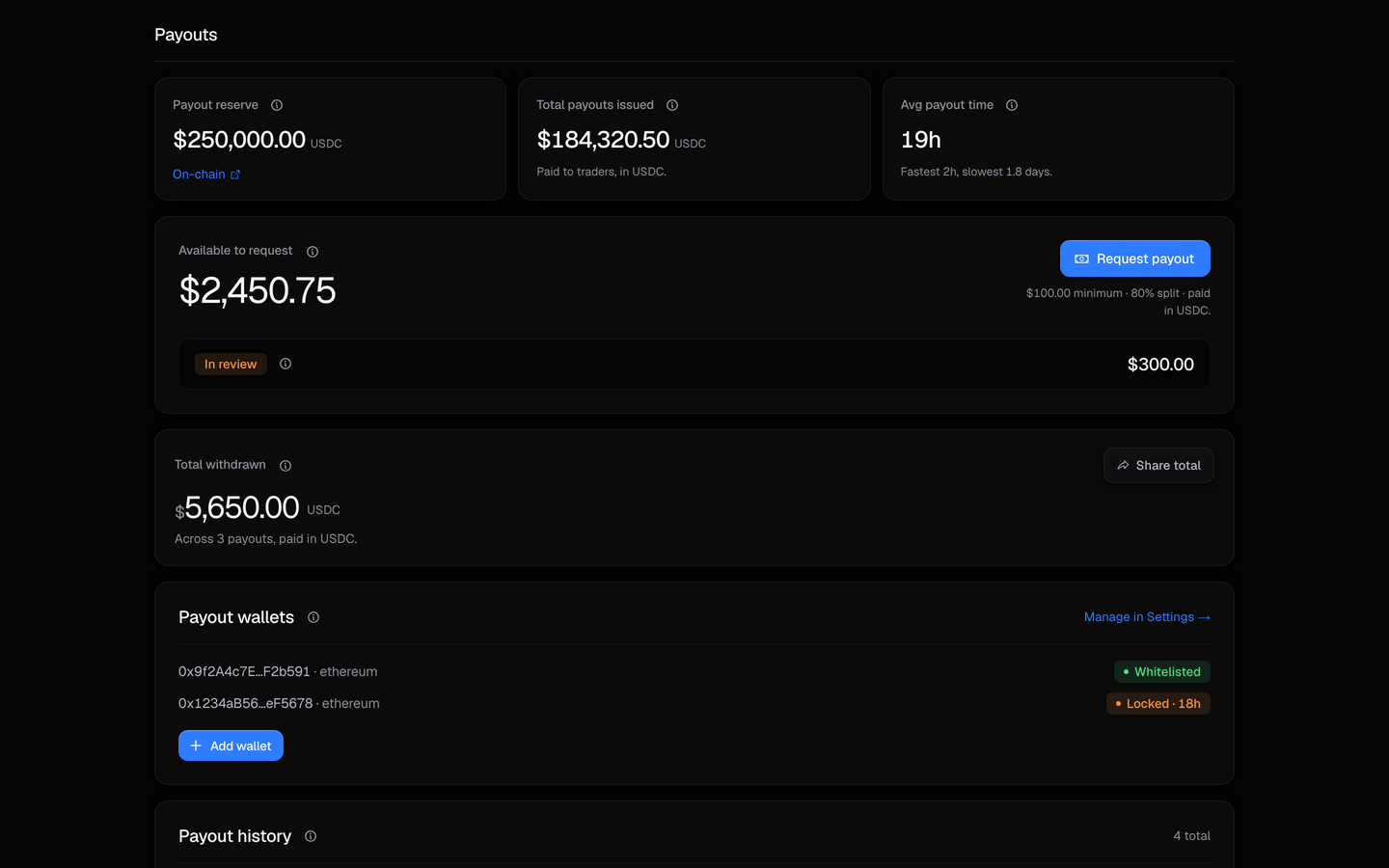
The available-to-request panel
The top of the page shows what you can withdraw right now and your lifetime total.
| Field | What it shows |
|---|---|
| Available to request | Your share of realized profit that is above your high-water mark and not yet withdrawn, totalled across your funded accounts. It is what you have earned, not what a single request can take - the per-account figures are in the account picker. |
| Total withdrawn | Your lifetime withdrawn amount in USDC, across every payout and every account. |
| Payout reserve | A platform-wide trust figure showing funds backing trader payouts. It appears only once a real, on-chain-verifiable reserve is wired, never as a placeholder number. |
The line under the Request payout button follows what you can actually draw, not the total: if no single account clears the minimum yet, it tells you how much further one has to go, and if every account is held by an open position it says so instead.
Choosing which account to withdraw from
Opening a request shows one row per funded account, so the choice is made on real figures rather than a single number that belongs to no account in particular.
| On each row | What it means |
|---|---|
| Account | The account's size and evaluation type, for example "$5K Arena · 1-Step", so two accounts are never confused. |
| Available | That account's own share: its realized profit above its own high-water mark, less what has already been withdrawn from it, including profit earned since your last payout. |
| Blocked | An account holding an open position cannot be withdrawn from. The row stays visible and disabled, reading Close its open positions first, rather than disappearing. |
Only funded accounts appear. An account still in evaluation has no profit share to draw.
The minimum is per account, not a total
The $50 minimum applies to the account you draw from. Two accounts holding $30 each do not add up to a withdrawable $60, because no single request can take both. The same is true of the identity check: it is assessed against the account you are actually drawing.
Requesting a payout
Open the request flow, pick the account to withdraw from, choose a whitelisted wallet, enter your 2FA code (or use a passkey), and submit. The requested amount is reserved on request and refunded in full if it is rejected, so a request never silently consumes your balance.
There is no amount box. A request takes the selected account's full available share, which is why the picker shows that figure on every row.
| Step | What happens |
|---|---|
| Choose an account | You pick one funded account. Its full available share is the amount. |
| Request | You pick an eligible wallet and confirm with 2FA. The amount is reserved against that account's available balance. |
| Review | The request is reviewed before any funds move. While it is open its status reads In review. |
| Payment | Once approved, the payout is sent in USDC to your wallet and the status moves to Paid. Disbursement is manual, so it is not instant. |
| Rejected | If a request is rejected, the reserved amount is returned to that account's available balance in full. |
Before you withdraw
A payout needs a funded account, two-factor authentication enabled, and a whitelisted wallet that has cleared its 48h new-wallet time-lock. Identity verification is required once your lifetime unverified payouts would cross $1,000. You set all of these up on the Settings page.
Payout terms
Every number here is read from the live configuration, so it matches what the system actually enforces.
| Term | Value |
|---|---|
| Profit split (yours once funded) | 80% |
| Minimum payout | $50 |
| Paid in | USDC |
| Network | USDC on Ethereum |
| Whitelisted wallets | up to 3 |
| New-wallet time-lock | 48h |
| Identity check required above | $1,000 in unverified payouts |
Wallets and networks
Payouts only ever go to a wallet you have added and whitelisted yourself, on a network you choose. You manage these in Settings, under Payouts and wallets: you can keep up to 3 wallets, and a newly added wallet is held for 48h before it can receive a payout. Supported networks are USDC on Ethereum.
The network cannot be recovered
A withdrawal is sent on the network you select, and a send to the wrong network is unrecoverable. The network is always shown and never inferred, so check it before you confirm.
Payout history
Every request appears in the history list with its current status and the account it drew from, labelled by size and evaluation type, so you can track it from request to paid and see where each payment came from.
Payouts made before withdrawals became per-account read All accounts, which is the true statement about them: they really did draw from every funded account at once. No older payment is relabelled to a single account after the fact.
| Status | Meaning |
|---|---|
| In review | Requested and awaiting review. The amount is reserved. |
| Approved / Processing | Cleared review and being sent. |
| Paid | Sent to your wallet. Paid rows with an on-chain transaction can open a shareable withdrawal certificate. |
| Rejected | Not approved. The reserved amount was refunded to your available balance. |
Why the same profit is never paid twice
Payouts are measured against a high-water mark, and each funded account carries its own: only realized profit above the highest point that account has already been paid on is available to withdraw from it. Withdrawing does not reset your progress, and profit you have already taken is not counted again.
Related
- Payouts and withdrawals - the authoritative, enforced payout rules and numbers.
- Settings - add and manage your withdrawal wallets, 2FA, and identity verification.
- The Dashboard - see your payoutable balance and profit across accounts.